Pages

Ads 468x60px

Labels

Text Widget

Recent Posts

Download

Showing posts with label DEFINITIONS. Show all posts

Sunday, 4 March 2012

Relationships with other disciplines

There exists an overlap between the sciences and engineering practice; in engineering, one applies science. Both areas of endeavor rely on accurate observation of materials and phenomena. Both use mathematics and classification criteria to analyze and communicate observations.

Scientists may also have to complete engineering tasks, such as designing experimental apparatus or building prototypes. Conversely, in the process of developing technology engineers sometimes find themselves exploring new phenomena, thus becoming, for the moment, scientists.

In the book What Engineers Know and How They Know It,[28] Walter Vincenti asserts that engineering research has a character different from that of scientific research. First, it often deals with areas in which the basic physics and/or chemistry are well understood, but the problems themselves are too complex to solve in an exact manner.
Examples are the use of numerical approximations to the Navier-Stokes equations to describe aerodynamic flow over an aircraft, or the use of Miner's rule to calculate fatigue damage. Second, engineering research employs many semi-empirical methods that are foreign to pure scientific research, one example being the method of parameter variation[citation needed].
As stated by Fung et al. in the revision to the classic engineering text, Foundations of Solid Mechanics:
"Engineering is quite different from science. Scientists try to understand nature. Engineers try to make things that do not exist in nature. Engineers stress invention. To embody an invention the engineer must put his idea in concrete terms, and design something that people can use. That something can be a device, a gadget, a material, a method, a computing program, an innovative experiment, a new solution to a problem, or an improvement on what is existing. Since a design has to be concrete, it must have its geometry, dimensions, and characteristic numbers. Almost all engineers working on new designs find that they do not have all the needed information. Most often, they are limited by insufficient scientific knowledge. Thus they study mathematics, physics, chemistry, biology and mechanics. Often they have to add to the sciences relevant to their profession. Thus engineering sciences are born."[29]
Although engineering solutions make use of scientific principles, engineers must also take into account safety, efficiency, economy, reliability and constructability or ease of fabrication, as well as legal considerations such as patent infringement or liability in the case of failure of the solution.

engineering-history

History

Engineering has existed since ancient times as humans devised fundamental inventions such as the pulley, lever, and wheel. Each of these inventions is consistent with the modern definition of engineering, exploiting basic mechanical principles to develop useful tools and objects.
The term engineering itself has a much more recent etymology, deriving from the word engineer, which itself dates back to 1325, when an engine’er (literally, one who operates an engine) originally referred to “a constructor of military engines.”[4] In this context, now obsolete, an “engine” referred to a military machine, i.e., a mechanical contraption used in war (for example, a catapult). Notable exceptions of the obsolete usage which have survived to the present day are military engineering corps, e.g., the U.S. Army Corps of Engineers.
The word “engine” itself is of even older origin, ultimately deriving from the Latin ingenium (c. 1250), meaning “innate quality, especially mental power, hence a clever invention.”[5]
Later, as the design of civilian structures such as bridges and buildings matured as a technical discipline, the term civil engineering[3] entered the lexicon as a way to distinguish between those specializing in the construction of such non-military projects and those involved in the older discipline of military engineering

Saturday, 3 March 2012

The Interview

The Interview

Interview is an opportunity for both the employer and the applicant to gather information. The employer wants to know if you, the applicant, have the skills, knowledge, self-confidence, and motivation necessary for the job. At this point you can be confident that the employer saw something of interest in your resume. He or she also wants to determine whether or not you will fit in with the organization's current employees and philosophy. Similarly, you will want to evaluate the position and the organization, and determine if they will fit into your career plans. The interview is a two-way exchange of information. It is an opportunity for both parties to market themselves. The employer is selling the organization to you, and you are marketing your skills, knowledge, and personality to the employer.
        Interview Preparation
Research is a critical part of preparing for an interview. If you haven't done your homework, it is going to be obvious. Spend time researching and thinking about yourself, the occupation, the organization, and questions you might ask at the end of the interview.
        Step 1: Know Yourself
The first step in preparing for an interview is to do a thorough   self-assessment so that you will know what you have to offer an employer. It is very important to develop a complete inventory of skills, experience, and personal attributes that you can use to market yourself to employers at any time during the interview process. In developing this inventory, it is easiest to start with experience. Once you have a detailed list of activities that you have done (past jobs, extra-curricular involvements, volunteer work, school projects, etc.), it is fairly easy to identify your skills.
 Simply go through the list, and for each item ask yourself "What could I have learned by doing this?" "What skills did I develop?" "What issues/circumstances have I learned to deal with?" Keep in mind that skills fall into two categories - technical and generic. Technical skills are the skills required to do a specific job. For a laboratory assistant, technical skills might include knowledge of sterilization procedures, slide preparation, and scientific report writing. For an outreach worker, technical skills might include counseling skills, case management skills, or program design and evaluation skills. Generic skills are those which are transferable to many work settings. Following is a list of the ten most marketable skills. You will notice that they are all generic.
  • Analytical/Problem Solving
  • Flexibility/Versatility
  • Interpersonal
  • Oral/Written Communication
  • Organization/Planning
  • Time Management
  • Motivation
  • Leadership
  • Self-Starter/Initiative
  • Team Player
Often when people think of skills, they tend to think of those they have developed in the workplace. However, skills are developed in a variety of settings. If you have ever researched and written a paper for a course, you probably have written communication skills. Team sports or group projects are a good way to develop the skills required of a team player and leader. Don't overlook any abilities you may have When doing the research on yourself, identifying your experience and skills is important, but it is not all that you need to know. Consider the answers to other questions such as:
  • How have I demonstrated the skills required in this position?
  • What are my strong points and weak points?
  • What are my short term and long term goals?
  • What can I offer this particular employer?
  • What kind of environment do I like? (i.e. How do I like to be supervised? Do I like a fast pace?)
  • What do I like doing?
  • Apart from my skills and experience, what can I bring to this job?
        Step 2: Know the Occupation
The second step in preparing for an interview is to research the occupation. This is necessary because in order to present a convincing argument that you have the experience and skills required for that occupation, you must first know what those requirements and duties are. With this information uncovered, you can then match the skills you have (using the complete skills/experience inventory you have just prepared) with the skills you know people in that occupational field need. The resulting "shortlist" will be the one that you need to emphasize during the interview.
It is also in your best interest to identify the approximate starting salary for that position, or those similar. There are several ways to find out about an occupation:
  • Acquire a copy of the job description from the employer (Human
  • Resources/Personnel) or check with Student Employment Services. If you are responding to an advertisement, this may also supply some details.
The Career Resource Centre has general information files on a variety of occupations. Make sure you have read through the appropriate file and are updated on the occupation. If you belong to a professional association related to the occupation, use its resources. These associations often publish informative newsletters and sponsor seminars. It is also a good way to meet people working in the field. Conduct information interviews with people working in the field. Read articles about people in the occupation, and articles written by people in the occupation. Sources include newspapers, magazines and the internet. Find out what the future trends are in the area. Is technology changing the job?
        Step 3: Know the Organization
The more you know about an organization, the better prepared you will be to discuss how you can meet its needs. Some of the characteristics that you should know about an organization are:
  • Where is it located?
  • How big is it?
  • What are its products and who does it serve?
  • How is the organization structured?
  • What is its history?
  • Have there been any recent changes, new developments?
There are a number of ways in which you can access this information. Most medium- to large-sized organizations publish information about themselves. You can access this a number of ways:
  • On campus at the Student Employment Services (company literature and business directories) or at the Drake Centre Library
  • The Winnipeg Centennial Library has a business microfiche with information on over 5000 Canadian companies and business directories
  • Many companies have internet home pages which you can locate by searching by industry and company name
  • Finally, you can visit or phone the organization and request some information on their products, services or areas of research
If the organization is fairly small, or fairly new, there may not be much information published. In this case, it will be necessary to do an information interview. Contact someone within the organization, introduce yourself, explain that you are considering moving into the field, and ask if it would be possible to meet with him/her to inquire about the company/organization and about what exactly the position would involve.

Step 4: Prepare Questions
Having completed your background research, you are now ready to prepare questions to ask the interviewer(s). Try to think of questions for which the answer was not readily available in company literature. Intelligent well thought-out questions will demonstrate your genuine interest in the position. Be careful how many questions you ask, however, as too many can imply you feel the interview was not successfully run. Pick your questions with care - this is your chance to gather information, so ask about what you really want to know. Avoid sounding critical by mentioning negative information you may have discovered. This is one of the most effective ways to compare different employers, so for issues of particular importance to you (for example, whether they support staff upgrading), you should ask the same questions of each employer. Some sample questions are:
  • What are the most significant factors affecting your business today? How have changes in technology most affected your business today? 
  • How has your business/industry been affected by the recession?
  • How has your company grown or changed in the last couple of years?
  • What future direction do you see the company taking?
  • Where is the greatest demand for your services or product?
  • Where is most of the pressure from increased business felt in this company?
  • Which department feels it the most?
  • How do you differ from your competitors?
  • How much responsibility will I be given in this position?
  • What do you like about working with this organization?
  • Can you tell me more about the training program?
  • Have any new product lines been introduced recently?
  • How much travel is normally expected?
  • What criteria will be used to evaluate my performance?
  • Will I work independently or as part of a team?
  • How did you advance to your position?
  • What are the career paths available in this organization?
  • When can I expect to hear from you regarding this position?
It is very important to ask the last question because employers want to hire individuals who are interested in the position - and asking this question definitely helps to demonstrate interest on your part. Exercise judgment when asking questions to an employer. When being interviewed by a large company that has a high profile, one would not ask the question "What is the history of your company and how was your company started?" You can find the answer to this question in the company's annual report or articles in magazines/newspapers. However, small- and medium-sized companies do not always produce publicly available annual reports and it may be difficult to access information on the company and its role in the industry. This question is appropriate if you have exercised all other ways to find out the answer.


Wednesday, 29 February 2012

Do I need to be licensed as an engineer?

All states require licensure for engineers who offer their services directly to the public. Engineers who are licensed are called Professional Engineers (PE). Civil, mechanical structural, industrial and environmental engineers are most likely to seek licensure because they often work for government agencies. Computer engineers are least likely to seek licensure.
Although licensure laws vary, most boards require four steps:
  1. Earn a bachelor's degree in engineering from a school accredited by the Accreditation Board for Engineering and Technology (ABET)
  2. Pass the Fundamentals of Engineering (FE) examination
  3. Complete at least four years of engineering experience
  4. Pass the Principles and Practice of Engineering (PE) examination

What are some engineering graduate school prerequisites?

All schools differ, but you'll most likely need to have completed classes in calculus, chemistry, communication, computer programming, engineering, problem solving, English, and physics.

What is an engineer?

Engineering is the art of applying scientific and mathematical principles, experience, judgment, and common sense to make things that benefit people. Engineers design bridges and important medical equipment as well as processes for cleaning up toxic spills and systems for mass transit. Engineering is the process of producing a technical product or system to meet a specific need.        

Sunday, 19 February 2012

Electronic Circuit Symbols

Wires


Electronic ComponentCircuit SymbolDescription
Wire
Wire Circuit Symbol
Wire Circuit Symbol
Used to connect one component to another.
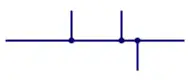
  Wires Joined
Wires Joined Circuit Symbol
 
One device may be connected to another through wires. This is represented by drawing “blobs” on the point where they are shorted.
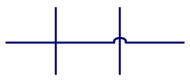
  Unjoined Wires
Wires Not Joined Circuit Symbol
When circuits are drawn some wires may not touch others. This can only be shown by bridging them or by drawing them without blobs. But bridging is commonly practised as there will not arise any confusion.
 

Power Supplies


Electronic ComponentCircuit SymbolDescription
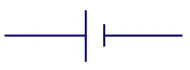
  Cell
Cell Circuit Symbol
Cell Circuit Symbol
 
Used to provide a supply for a circuit.
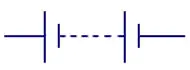
Battery
Battery Circuit Symbol
A battery has more than a cell and is used for the same purpose. The smaller terminal is negative and the larger one is positive. Abbreviated as ‘B’.
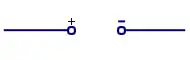
DC Supply
DC Supply Circuit Symbol
Used as a DC power supply, that is, the current will always flow in one direction.
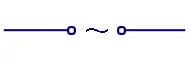
AC Supply
AC Supply Circuit Symbol
Used as AC power supply, that is, the current will keep alternating directions.
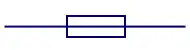
Fuse
Fuse Circuit Symbol
Fuse Circuit Symbol
Used in circuits where a probability of excessive current flows. The fuse will break the circuit if excessive current flows and saves the other devices from damage.
  Transformer
Transformer Circuit Symbol
 
Used as an ac power supply. Consists of two coils, the primary and secondary that are linked together through an iron core. There is no physical connection between the two coils. The principle of mutual inductance is used to obtain power. Abbreviated as ‘T’.
Earth/Ground
Earth Circuit Symbol
Used in electronic circuits to represent the 0 volts of the power supply. It can also be defined as the real earth , when it is applied in radio circuits and power circuits.
 

Resistor


Electronic ComponentCircuit SymbolDescription
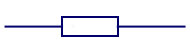
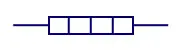
Resistor  
Resistor Circuit Symbol
A resistor is used to restrict the amount of current flow through a device. Abbreviated as ‘R’.
Rheostat
Rheostat Circuit Symbol
A rheostat is used to control the current flow with two contacts. Applicable in controlling lamp brightness, capacitor charge rate, etc.
Potentiometer
Potentiometer Circuit Symbol
A potentiometer is used to control the voltage flow and has three contacts. Have applications in changing a mechanical angle change to an electrical parameter. Abbreviated as ‘POT’.
Preset
Preset Circuit Symbol
Presets are low cost variable resistors that are used to control the charge flow with the help of a screw driver. Applications where the resistance is determined only at the end of the circuit design.
 

Capacitor


Electronic ComponentCircuit SymbolDescription
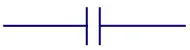
Capacitor
Capacitor Circuit Symbol
Capacitor is a device that is used to store electrical energy. It consists of two metals plates that are separated by a dielectric. It is applicable as a filter, that is, to block DC signals and allow AC signals. Abbreviated with the letter ‘C’.
Capacitor - Polarized
Capacitor-Polarised Circuit Symbol
Capacitor can be used in a timer circuit by adding a resistor.
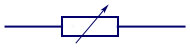
Variable Capacitor
Variable Capacitor Circuit Symbol
Used to vary the capacitance by turning the knob. A type of variable capacitor is the trimmer capacitor that is small in size. The notations are all the same.

Diode


Electronic ComponentCircuit SymbolDescription
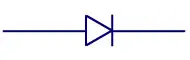
Diode
Diode Circuit Symbol
A diode is used to allow electric current to flow in only one direction. Abbreviated as ‘D’.
Light Emitting Diode (LED)
LED Circuit Symbol
LED Circuit Symbol
LED is used to emit light when a current is passed through the device. It is abbreviated as LED.
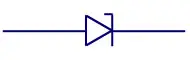
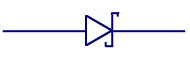
Zener Diode
Zener Diode Circuit Symbol
After a breakdown voltage, the device allows current to flow in the reverse direction as well. It is abbreviated as ‘Z’.
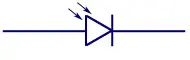
Photo Diode
Photo Diode Circuit Symbol
Photodiode works as a photo-detector and converts light into its corresponding voltage or current.
Tunnel Diode
Tunnel Diode Circuit Symbol
Tunnel Diode is known for its high-speed operation due to its application in quantum mechanical effects.
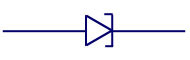
Schottky Diode
Schottky Diode Circuit Symbol
The Schottky Diode is known for its large forward voltage drop and hence has great applications in switching circuits.

Transistor


Electronic ComponentCircuit SymbolDescription
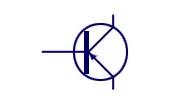
  NPN Transistor
Transistor NPN Circuit Symbol
 
This is a transistor with a layer of P-doped semiconductor fixed between two layers of N-doped semiconductors that act as the emitter and collector. Abbreviated as ‘Q’.
  PNP Transistor
Transistor PNP Circuit Symbol
 
This is a transistor with a layer of N-doped semiconductor fixed between two layers of P-doped semiconductors that act as the emitter and collector. Abbreviated as ‘Q’.
  Phototransistor
Phototransistor Circuit Symbol
 
The working of a phototransistoris similar to that of a bipolar transistor with a difference that it converts light into its corresponding current. The phototransistor can also act as a photodiode if the emitter is not connected.
Field Effect Transistor
Field Effect Transistor Circuit Symbol
Like a transistor, a FET has three terminals, the Gate, Source and Drain. The device has an electric field that controls the conductivity of a channel of one type charge carrier in a semiconductor substance.
N-Channel Junction FET
n-channel Junction Field Effect Transistor (JFET) Circuit Symbol
The Junction Field Effect Transistor (JFET) is the simplest type of FET with applications in Switching and voltage variable resistor. In an N-channel JFET an N-type silicon bar has two smaller pieces of P-type silicon material diffused on each sides of its middle part, forming P-N junctions.
P-Channel Junction FET
p-channel Junction Field Effect Transistor (FET) Circuit Symbol
P-channel JFET is similar in construction to N-channel JFET except that P-type semiconductor base is sandwiched between two N-type junctions. In this case majority carriers are holes.
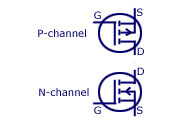
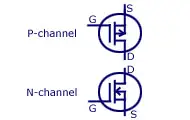
Metal Oxide Semiconductor FETGiven Below
Abbreviated as MOSFET. MOSFET is a three terminal device and is controlled by a gate bias. It is known for its low capacitance and low input impedance.
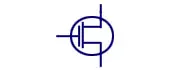
  Enhancement MOSFET
e-MOSFET Circuit Symbol
 
The enhancement MOSFET structure has no channel formed during its construction. Voltage is applied to the gate, so as to develop a channel of charge carriers so that a current results when a voltage is applied across the drain-source terminals. Abbreviated as e-MOSFET.
  Depletion MOSFET
d-MOSFET Circuit Symbol
 
In the depletion-mode construction a channel is physically constructed and a current between drain and source is due to voltage applied across the drain-source terminals. Abbreviated as d-MOSFET.

Logic Gates


GateStandard SymbolIEC SymbolDescription
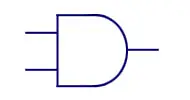
  AND Gate
AND GATE Symbol
AND GATE Symbol
AND Gate IEC Symbol
AND Gate IEC Symbol
 
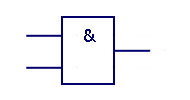
If all the inputs of an AND gate are HIGH, then the output will also be HIGH. If any one of them is LOW, the output will also be LOW.
NAND Gate
NAND Gate Symbol
NAND Gate Symbol
NAND Gate IEC Symbol
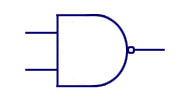
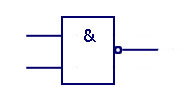
Short form for NOT AND Gate. Of all the inputs are HIGH, the output will be LOW. If any one input is LOW, the output will be HIGH.
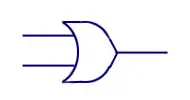
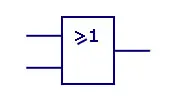
  OR Gate
OR Gate Symbol
OR Gate Symbol
OR Gate IEC Symbol
OR Gate IEC Symbol
 
If any one of the input is HIGH, the output will also be HIGH. If both inputs are LOW, the output will also be LOW.
  NOR Gate
NOR Gate Symbol
NOR Gate Symbol
NOR Gate IEC Symbol
NOR Gate IEC Symbol
 
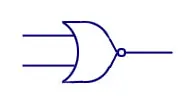
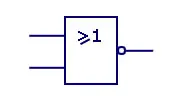
Short form for NOT OR. If both inputs are LOW, the output will also be LOW. For other cases, the output will be HIGH.
  EX-OR Gate
EX-OR Gate Symbol
EX-OR Gate Symbol
EX-OR Gate IEC Symbol
 
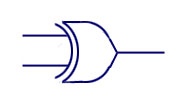
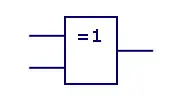
Short form for Exclusive NOR. If both inputs are either in LOW state r HIGH state, the output will be LOW. If both inputs are different, the output will be HIGH.
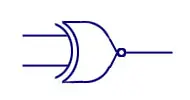
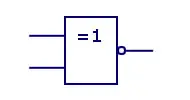
  EX-NOR Gate
EX-NOR Gate Symbol
EX-NOR Gate Symbol
EX-NOR Gate IEC Symbol
 
Short form for Exclusive NOT OR. If both the inputs are the same, the output will be HIGH. If both are different, the output will also be different.
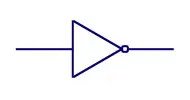
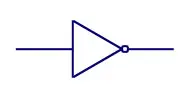
  NOT Gate
NOT Gate  Symbol
NOT Gate Symbol
NOT Gate  Symbol
NOT Gate Symbol
 
Also known as the inverter Gate. There is only one input for this gate. If the input is HIGH, the output will be LOW. If the input is LOW, the output will be HIGH.

Meters


Electronic ComponentCircuit SymbolDescription
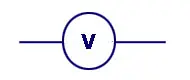
  Voltmeter
Voltmeter Circuit Symbol
 
Voltmeter is used to measure the voltage at a certain point in the circuit.
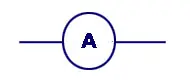
Ammeter
Ammeter Circuit Symbol
An Ammeter is used to measure the current that passes through the circuit at a particular point.
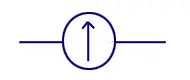
Galvanometer
Galvanometer Circuit Symbol
A galvanometer is used to measure very small currents in the order of 1 milli ampere or less.
  Ohmmeter
Ohmmeter Circuit Symbol
 
Resistance of the circuit is measured using an Ohmmeter.
Oscilloscope
Oscilloscope Circuit Symbol
An oscilloscope is used to measure the voltage and time period of signals along with their shape display.

Sensors


Electronic ComponentCircuit SymbolDescription
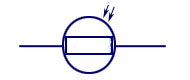
Light Dependent Resistor (LDR)
LDR Circuit Symbol
LDR Circuit Symbol
It is abbreviated as LDR. Light Dependent Resistor is used to convert light into its corresponding resistance. Instead of directly measuring the light, it senses the heat content and converts it onto resistance.
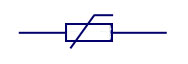
Thermistor
Thermistor Circuit Symbol
Instead of directly measuring the light, a thermistor senses the heat content and converts it into resistance. Abbreviated as ‘TH’.

Switches


Electronic ComponentCircuit SymbolDescription
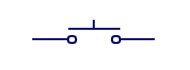
  Push Switch
Push Switch Circuit Symbol
 
This is an ordinary switch that passes current only upon pressing.
  Push to Break Switch
Push to Break Switch Circuit Symbol
 
The push to break switch is usually kept in the ON state (closed). It turns to OFF state (open) only when the switch is pressed.
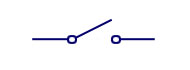
  Singe Pole Single Throw Switch
On Off Switch (SPST) Circuit Symbol
 
Also known as the ON/OFF switch. This switch allows the flow of current only when it is kept ON. Abbreviated as SPST.
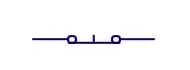
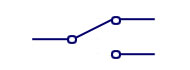
Single Pole Double Throw Switch
2-Way Switch (SPDT) Circuit Symbol
Also known as the 2-way switch. It can be also called as an ON/OFF/ON switch as it has an OFF position in the center. The switch causes the flow of current in two directions, depending on its position. It can be abbreviated as SPDT.
Double Pole Single Throw Switch
Dual On-Off Switch (DPST) Circuit Symbol
Abbreviated as DPST. Can also be called as a dual ON-OFF switch. This is used to isolate between the live and neutral connections in the main electrical line.
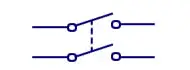
Double Pole Double Throw Switch
DPDT Circuit Symbol
DPDT Circuit Symbol
Abbreviated as DPDT. The switch uses a central OFF position and is applied as reversing switch for motors.
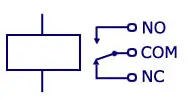
  Relay
Relay Circuit Symbol
 
Relay is abbreviated as ‘RY’. This device can easily switch a 230 Volt AC mains circuit. It has three switching stages called Normally Open (NO). Normally Closed (NC), and Common (COM).

Audio and Radio Devices


Electronic ComponentCircuit SymbolDescription
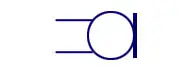
Microphone
Microphone Circuit Symbol
This device is used for converting sound to its corresponding electrical energy. Abbreviated as ‘MIC’.
Earphone
Earphone Circuit Symbol
Does the reverse process of microphone and converts electrical energy into sound.
Loudspeaker
Loudspeaker Circuit Symbol
Does the same operation as an earphone, but converts an amplified version of the electrical energy into its corresponding sound.
Piezo-Transducer
PiezoTransducer Circuit Symbol
It is a transducer that converts electrical energy into sound.
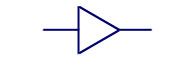
Amplifier
Amplifier Circuit Symbol
Used to amplify a signal. It is mainly used to represent a whole circuit rather than just one component.
Aerial
Aerial  Circuit Symbol
Aerial Circuit Symbol
This device is used to transmit/receive signals. Abbreviated as ‘AE’.

Output Devices


Electronic ComponentCircuit SymbolDescription
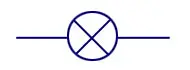
Lighting Lamp
Lamp Circuit Symbol
Lamp Circuit Symbol
This is used to provide light for the output.
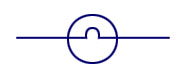
Indicator Lamp
Lamp Indiator Circuit Symbol
Used to convert electrical energy into light. The best example is the warning light on a car dashboard.
Heater
Heater Circuit Symbol
This transducer is used to change electrical energy into heat.
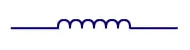
Inductor
Inductor Circuit Symbol
Inductor is used to produce a magnetic field when a certain current is passed through a coil of wire. The wire is coiled on a soft iron core. Have applications in motors, and tank circuits. Abbreviated as ‘L’.
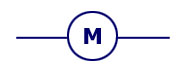
Motor
Motor Circuit Symbol
This device is used to convert electrical energy into mechanical energy. Can be used as a generator as well. Abbreviated as ‘M’.
Bell
Bell Circuit Symbol
Bell Circuit Symbol
Used to produce a sound as the output, according to the electrical energy produced as the input.
Buzzer
Buzzer Circuit Symbol
It is used to produce an output sound corresponding to the electrical energy in the input.
 

Sample text

Sample Text

Sample Text